1 文章添加首页图片 1.1 设置文章的默认封面图 在主题配置文件中添加:(我的主题配置文件是_config.fluid.yml)按照每个人自己的设置
1 2 3 4 5 6 7 8 9 10 11 12 13 14 post: default_index_img: - https://img.xjh.me/random_img.php?type=bg&ctype=nature&return=302
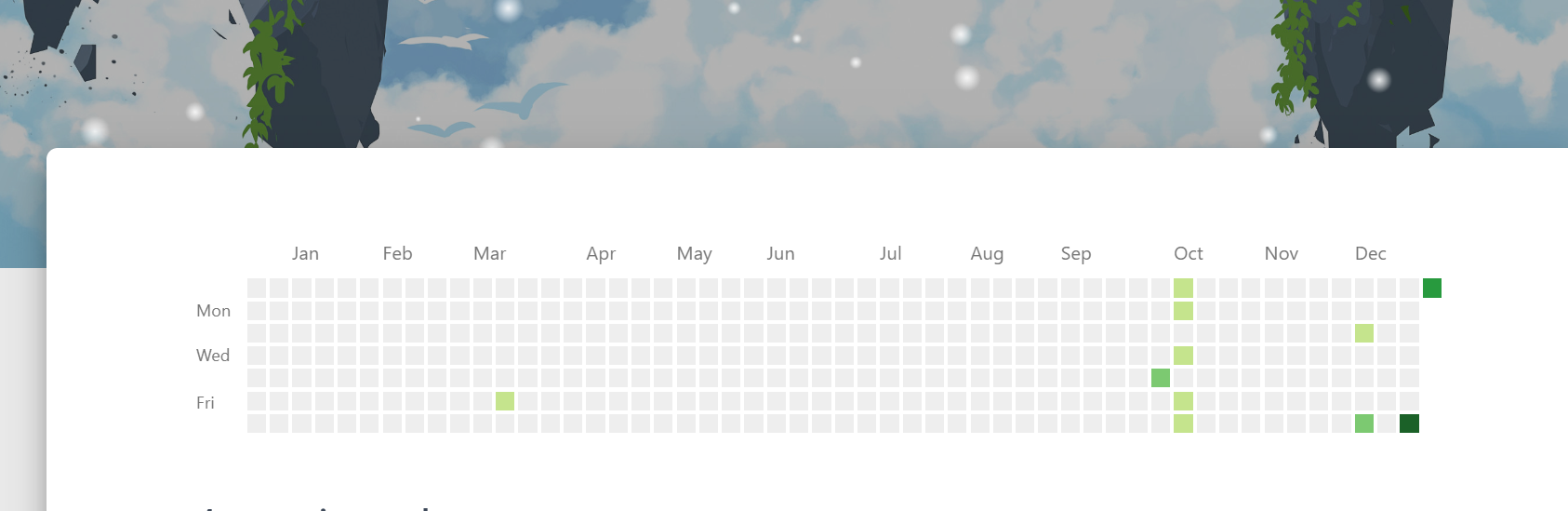
2 添加Github Chart 2.1 什么是github chart? github chart是在github中用于显示提交频次的绿色日历。
我们可以通过Github API提取数据生成图标,但是已经有前辈做了相关的开源方法。
2.2 ghchart
2.3 使用方法 访问链接:https://ghchart.rshah.org/<github-user-name> 即可获取指定用户的贡献图表,因为信息都是公开的,所以谁都可以直接拿到
还可以选择一个颜色作为主题颜色,比如浅蓝 26a397
用法为https://ghchart.rshah.org/颜色/<github-user-name>
2.4 添加到 Fluid 主题博客中
比如我想将 Github Chart 添加到 归档页 中
那么就需要修改 \node_modules\hexo-theme-fluid\layout\archive.ejs 文件,添加如下代码
1 2 3 <div style ="padding: 2vh 0 5vh 0" > <img src ="https://ghchart.rshah.org/26a397/xianghua-2" alt ="My Github Chart" width =100% position ='relative' > </div >
效果图如下
3 背景图添加雪花动态 3.1 在根目录source下新建js/snow.js 新建js/snow.js文件,内容如下
1 2 3 4 5 6 7 8 9 10 11 12 13 14 15 16 17 18 19 20 21 22 23 24 25 26 27 28 29 30 31 32 33 34 35 36 37 38 39 40 41 42 43 44 45 46 47 48 49 50 51 52 53 54 55 56 57 58 59 60 61 62 63 64 65 66 67 68 69 70 71 72 73 74 75 76 77 78 79 80 81 82 83 84 85 86 87 88 89 90 91 92 93 94 95 96 97 98 99 100 101 102 103 104 105 106 107 108 109 110 111 112 113 114 115 116 117 118 119 120 121 122 123 124 125 126 127 128 129 130 131 132 133 134 135 136 137 138 139 140 141 142 143 144 145 146 147 148 149 150 151 152 153 154 155 156 157 158 159 160 161 162 163 164 165 166 167 168 169 170 171 172 173 174 175 176 177 178 179 180 181 182 183 184 185 186 187 188 189 190 191 192 193 194 195 196 197 198 199 200 201 202 203 204 205 206 207 208 209 210 211 212 213 214 215 216 217 218 219 220 221 222 223 224 225 226 227 228 229 230 231 232 233 234 235 236 237 238 239 240 241 242 243 244 245 246 247 248 249 function snowFall (snow ) { snow = snow || {}; this .maxFlake = snow.maxFlake || 200 ; this .flakeSize = snow.flakeSize || 10 ; this .fallSpeed = snow.fallSpeed || 1 ; } requestAnimationFrame = window .requestAnimationFrame || window .mozRequestAnimationFrame || window .webkitRequestAnimationFrame || window .msRequestAnimationFrame || window .oRequestAnimationFrame || function (callback ) { setTimeout (callback, 1000 / 60 ); }; cancelAnimationFrame = window .cancelAnimationFrame || window .mozCancelAnimationFrame || window .webkitCancelAnimationFrame || window .msCancelAnimationFrame || window .oCancelAnimationFrame ; snowFall.prototype start = function ( snowCanvas.apply (this ); createFlakes.apply (this ); drawSnow.apply (this ) } function snowCanvas ( var snowcanvas = document .createElement ("canvas" ); snowcanvas.id = "snowfall" ; snowcanvas.width = window .innerWidth ; snowcanvas.height = window .innerHeight ; snowcanvas.setAttribute ("style" , "position: fixed; top: 0; left: 0; z-index: 1; pointer-events: none;" ); document .getElementsByTagName ("body" )[0 ].appendChild (snowcanvas); this .canvas = snowcanvas; this .ctx = snowcanvas.getContext ("2d" ); window .onresize = function ( snowcanvas.width = window .innerWidth ; snowcanvas.height = window .innerHeight ; } } function flakeMove (canvasWidth, canvasHeight, flakeSize, fallSpeed ) { this .x = Math .floor (Math .random () * canvasWidth); this .y = Math .floor (Math .random () * canvasHeight); this .size = Math .random () * flakeSize + 2 ; this .maxSize = flakeSize; this .speed = Math .random () * 0.2 + fallSpeed; this .fallSpeed = fallSpeed; this .velY = this .speed ; this .velX = 0 ; this .stepSize = Math .random () / 30 ; this .step = Math .random ()*Math .PI *2 ; } flakeMove.prototype update = function ( var x = this .x , y = this .y ; this .velX *= 0.98 ; if (this .velY <= this .speed ) { this .velY = this .speed } this .velX += Math .cos (this .step += .05 ) * this .stepSize ; this .y += this .velY ; this .x += this .velX ; if (this .x >= canvas.width || this .x <= 0 || this .y >= canvas.height || this .y <= 0 ) { this .reset (canvas.width , canvas.height ) } }; flakeMove.prototype reset = function (width, height ) { this .x = Math .floor (Math .random () * width); this .y = 0 ; this .size = Math .random () * this .maxSize + 2 ; this .speed = Math .random () * 1 + this .fallSpeed ; this .velY = this .speed ; this .velX = 0 ; }; flakeMove.prototype render = function (ctx ) { var snowFlake = ctx.createRadialGradient (this .x , this .y , 0 , this .x , this .y , this .size ); snowFlake.addColorStop (0 , "rgba(255, 255, 255, 0.9)" ); snowFlake.addColorStop (.5 , "rgba(255, 255, 255, 0.5)" ); snowFlake.addColorStop (1 , "rgba(255, 255, 255, 0)" ); ctx.save (); ctx.fillStyle = snowFlake; ctx.beginPath (); ctx.arc (this .x , this .y , this .size , 0 , Math .PI * 2 ); ctx.fill (); ctx.restore (); }; function createFlakes ( var maxFlake = this .maxFlake , flakes = this .flakes = [], canvas = this .canvas ; for (var i = 0 ; i < maxFlake; i++) { flakes.push (new flakeMove (canvas.width , canvas.height , this .flakeSize , this .fallSpeed )) } } function drawSnow ( var maxFlake = this .maxFlake , flakes = this .flakes ; ctx = this .ctx , canvas = this .canvas , that = this ; ctx.clearRect (0 , 0 , canvas.width , canvas.height ); for (var e = 0 ; e < maxFlake; e++) { flakes[e].update (); flakes[e].render (ctx); } this .loop = requestAnimationFrame (function ( drawSnow.apply (that); }); } var snow = new snowFall ({maxFlake :60 }); snow.start ();
3.2 根目录下新建scripts/injector.js文件 scripts文件夹下新建injector.js,内容如下
1
2
3
4
5
6
const { root : siteRoot = "/" } = hexo.config ;hexo.extend .injector .register ("body_end" ,`<script src="${siteRoot} js/snow.js"></script>` );
4 参考资料 Hexo’s Fluid 主题私人定制(持续更新) - Eren の 宇宙船 (erenship.com)
往事随风 (alec-97.github.io)
雪花动态参考:【Hexo】Fluid主题美化 - mRNA的碎碎念Blog (mrna16.github.io)